Header-Text-Box-Right

we have developed this blog to share my existing knowledge which I had gained in last 10+ years in IT. It is difficult to write all our knowledge on this blog but, still we am trying to put all our learning to this blog so, all the ideas will be shared.......

Saturday, January 12, 2013

How to Expose/Access Sql Server to Internet

Task - Expose Sel Server to Internet or Remote Access via IP
OS - Windows Server 2008 R2
Sql Version - Sql Server 2008 R2

To expose the server to internet we need open port for sql server (default port is 1433)

To open a port in the Windows firewall for TCP access

1. On the Start menu, click Run, type WF.msc, and then click OK.
2 . In the Windows Firewall with Advanced Security, in the left pane, right-click Inbound Rules, and then click New Rule in the action pane (upper right corner).
3. In the Rule Type dialog box, select Port, and then click Next.
4. In the Protocol and Ports dialog box, select TCP. Select Specific local ports, and then type the port number of the instance of the Database Engine, In my case we are using the default which is 1433. Click Next.
5. In the Action dialog box, select Allow the connection, and then click Next.
6. In the Profile dialog box, I am going to Leave Domain turned on and turn private and public off. Then click Next.
7. In the Name dialog box, type "Allow SQL 1433 Inbound” and for a description I am putting in the same. Then click Finish.

Then go to Sql Server Configuration Manager.
1. On the Start menu, Click Microsoft Sql Server 2008 R2
2. Click on Configuration Tools.
3. Sql Server Configuration Manager.

And follow the attached images


================================


Now you need to access the Sql server like "IP\sqlexpress" in name, please don't try only with IP address.


Saturday, April 7, 2012

Server Application Unavailable IIS Error

Generally the cause of Server Application Unavailable is the .net framework.

Error Snapshot

For ex. one of our site is in version 1.1 and the recently added site is in 2.0 or later or any other different versions running on the IIS.

How to Resolve:-
We need to create a new application pool on the IIS and assign the same to the version of the site.
Following image illustrates how to check the version of site.


For ex. Pool3_5 for version 3.5 and  Pool4_0 version 4.0 .
Following image illustrates how to create new Pool.

Step 1:


Step 2:


Step 3:


 You can also verify the IIS logs to locate the issue.

Thursday, April 5, 2012

How to make a site default on IIS 6 Windows Server 2003

While setting up an new Web server with Windows Server 2003 and IIS 6.

I have to set up my own custom domain (for ex. myname.com) as the default site on IIS. Means if I will run the server from IP my custom domain has to run.

The process is so, easy we need to setup few things in custom site.

Right click on Site>>Properties>>WebSite>>Click on Advnaced Button>>Leave the "Host header value" to be blank.

Please refer the image..


Tuesday, November 8, 2011

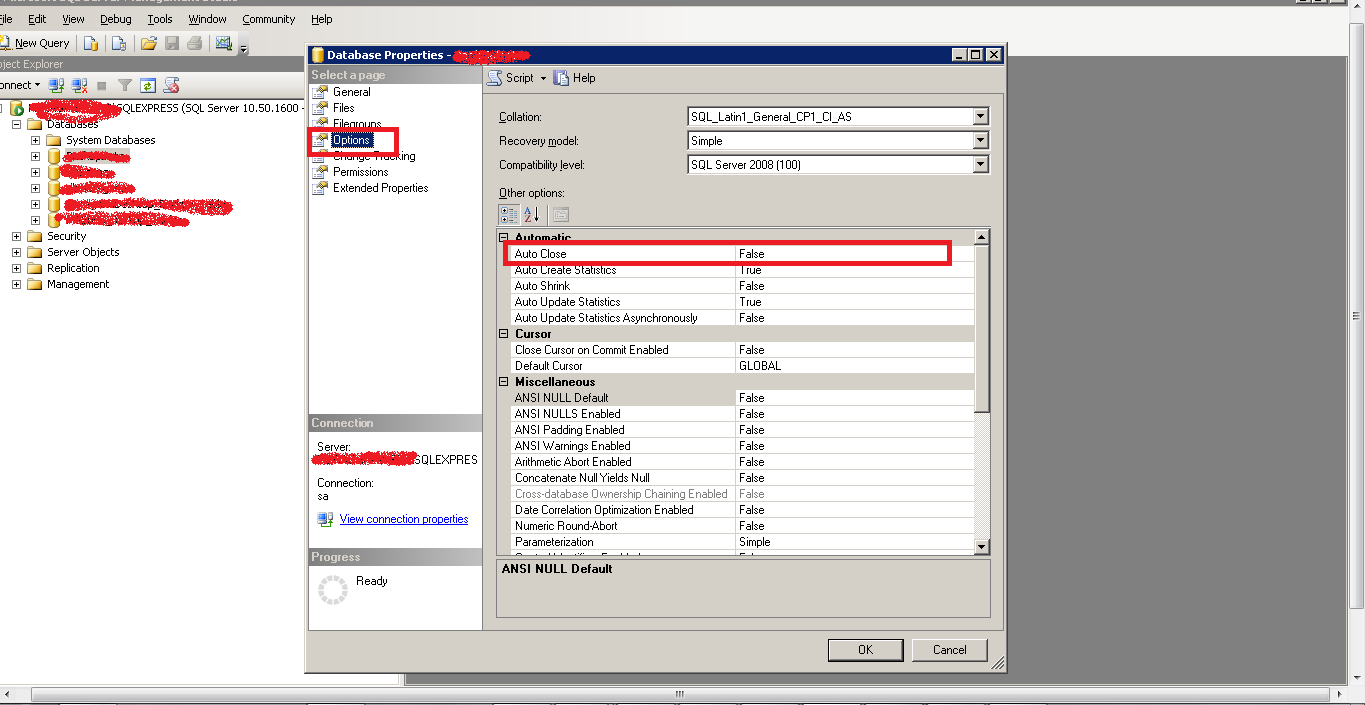
Windows Event Starting up database DatabaseName

Configuration:-
Windows Server 2003 R2 32 bit
Sql Express 2008 R2

While checking for server event as a part of maintenance we a information which is occuring after every 1-10 seconds the information is Event "Starting up database DatabaseName"

We found the solution and implemnted the same.

You need to open "Sql Express Management Studio>>Database>>Properties>>Options>>Auto Close" and set it to false.

For more information on this property, please refer
http://blogs.msdn.com/b/buckwoody/archive/2009/06/24/sql-server-best-practices-autoclose-should-be-off.aspx
http://msdn.microsoft.com/en-us/library/ms135094%28SQL.90%29.aspx

Monday, October 10, 2011

How to set focus on Table row using Javascript

We are developing Application for Google Smart TV and all is going well.

We are using Table, Div or some other elements which cannot be focused on using .focus() of java script.

We have used Table to show data in one of our page. Our target is to set the focus on first element of table i.e. first row.

We tried different solutions suggested on web but nothing worked. All the posts are suggesting to use focusable controls like text box, check box etc.

Finally we found solution on http://groups.google.com/group/mozilla.dev.tech.css/browse_thread/thread/42591922d95c6399

In the post "Stanimir Stamenkov" has used a term "if you just define a 'tabindex' on the element it becomes focusable" I assigned "tabindex" property to table row and then used .focus() and the focus reached to row.


Hope this will help all who are looking for such nice solutions.

Wednesday, June 15, 2011

How to allow special characters in URL or query string

I am using asp.net 4.0 with Sql server. I have an requirement to pass special characters in URL query string.

for example my URL need to be like http://mysite.com/default.aspx?a=xyx(abc)
In the above URL my special character is "(" and ")". While development I have not faced any issue but as I uploaded the files to serve it start giving error 404 (page not found) where ever I have use "(" or ")" special characters.

When I started searching I have tried many solutions. but nothing works for me.
Then on some site some one has sugested to check IIS log.

When I checked the log I found that I have Installed Microsoft URL Scan 3.1 on my server which is filtering the URL.

So, I need to allow "(" and ")" on my server so, I decided to allow there characters in my URL.

So, to add exception to URL Scan 3.1 you need to open urlscan.ini which you can find in "%windir%\system32\inetsrv\urlscan\"

You can use 2 sections to allow special characters
1) DenyQueryStringSequences
2) AlwaysAllowedUrls


DenyQueryStringSequences - In this section you can add and remove the allowed characters but this will allow for all the URLs.

AlwaysAllowedUrls - In this you can define a single URL like "/default.aspx".So, the special characters will be allowed to only single URL not to all the URL of the IIS sites

Friday, March 18, 2011

How to select data from another sql server

We have a target to run a JOB on server to import data from another SQL server instance.

For example take
Server 1 - Main
Server 2 - From which we have to import.

If you have admin rights on both the servers you can "Link the servers" under "Server Objects>>Linked Servers" Right click on the same and provide all the parameters of server or as an alternate you can run following command.

EXEC sp_addlinkedserver
@server = 'db1',
@srvproduct = 'SQLServer OLEDB Provider',
 @provider = 'SQLOLEDB',
 @datasrc = 'server2',
 @provstr='User Id=sa; Password=abc'

The above command parameters:-
 @server- An identification name of server.
@datasrc- Your server instance name or IP.

Your SQL will look like:-
Select * from db1.dbname.dbo.tablename

If sometimes the server will get changed, the above statement gives you the option to change the user name, password and server at any points of time without effecting the relevant SQL and SP written the basis of same.

Second Method (You can use the same if you does not have admin rights to add Linked server)

SELECT   *
FROM      OPENDATASOURCE(
         'SQLOLEDB',
         'Data Source=Server2;User ID=sa;Password=abc'
         ).dbname.dbo.tablename
        

In the above case you have to hard code all the parameters which you have to change in all the SQL and SP if something will get changed in future. So, I prefer to use Linked Server

Thursday, February 3, 2011

How to resolve "crdb_adoplus.dl" issue

With the launch of VS 2010, we start using VS 2010 and used the new improved IDE and features of VS 2010.

While woring with a windows based application we have requirement to use Crystal Report. We are able to add and design a new Crystal Report without facing any problem.

After writing the code to show data, we start getting a unique problem of "crdb_adoplus.dl". We searched for many solution and finally find the solution.

We added the following attributes in app.config

<startup useLegacyV2RuntimeActivationPolicy="true">
<supportedRuntime version="v4.0" sku=".NETFramework,Version=v4.0"/>
</startup>

So, the final app.config will be :-

<?xml version="1.0" encoding="utf-8" ?>
<configuration>

</connectionStrings>
<startup useLegacyV2RuntimeActivationPolicy="true">
<supportedRuntime version="v4.0" sku=".NETFramework,Version=v4.0"/>
</startup>
</configuration>

Reference :

http://social.msdn.microsoft.com/Forums/eu/vscrystalreports/thread/2503389c-6d25-48d3-bb15-25ed67f52f21

Friday, December 24, 2010

How to set max limt of File Upload in Asp.net

Many times I faced the same problem with all my applications, that is Max size of file to be uploaded to server.

By default, the maximum size limit of a file to be uploaded to a server using the ASP.NET FileUpload control is 4MB. You cannot upload anything that is larger than this limit.

If you wants to upload a file more the size of 4 MB which is by default, you have to make some changes in the application's web.config:

<configuration>
<system.web>
<httpRuntime maxRequestLength="xxx" />
</system.web>
</configuration>

Below is the small description of the parameters attributes.

maxRequestLength - Attribute limits the file upload size for ASP.NET application. This limit can be used to prevent denial of service attacks (DOS) caused by users posting large files to the server. The size specified is in kilobytes. As mentioned earlier, the default is "4096" (4 MB). Max value is "1048576" (1 GB) for .NET Framework 1.0/1.1 and "2097151" (2 GB) for .NET Framework 2.0.

executionTimeout - Attribute indicates the maximum number of seconds that a request is allowed to execute before being automatically shut down by the application. The executionTimeout value should always be longer than the amount of time that the upload process can take.

 
Design by Free WordPress Themes | Bloggerized by Lasantha - Premium Blogger Themes | cheap international calls