Posts

How to take back up of my sql database using C#

Image
You can also download running code. Taking a back up of my sql using C# is very easy but this also be termed as tricky backup. Like Sql server my sql does not provide built in stored procedures to take back up. For back up my sql use a Exe file named “mysqldump.exe” You will find this Exe file in “C:\Program Files\MySQL\MySQL Server 5.0\bin” folder of mySql. This file takes so many parameters for different options. But my task is to simply take a backup of single database To take a backup of single database following are the parameters mysqldump -u<usernane> -p <password> -h<servername or ip> <databasename> > <localtion to take backup> Please let me know if this helps you to perform your task easily.

Auto Complete Example in Asp.net C# Using JQuery

Image
Download Running Code Supporting JQuery Before writing this post I had written one another post which is using a pure JavaScript to show Auto complete or Auto delete example. My previous example is not using Jquery which is a famous and reliable way to present your data. One of the drawback of my previous example is it will become slow as I have to load a bulk data for auto complete box. I had received many comments on this post, some of them had appreciated and some of them had suggested using Jquery. One of my great readers had given an example of Jquey which I am posting to help you all. So, before posting this example I would like to say thanks to my reader Eng. Mohammed Ibrahim who had suggested and helped me to help others.

Auto Complete Example in Asp.net C#

There are too many methods to make an auto complete text box in asp.net You can use JQuery ( Use jquery for Auto Complete ), Ajax Auto complete extender and so on. If you will search on internet you will find so many examples which are using JQuery or Ajax Extender to show auto complete on websites. I had searched on many sites I had tried so many examples to populate auto complete list but, unfortunately, I am not able to find an efficient auto complete example. Finally after searching for many hours I had decided to write my own code. My example is using an asp.net C# to show auto complete. Here, code goes Download Code Run and try typing some numbers or text. You will find an auto complete list on page

How to use Enterprise Library using C#

Summary The Microsoft Enterprise Library is a collection of reusable software components (application blocks) designed to assist software developers with common enterprise development cross-cutting concerns (such as logging, validation, data access, exception handling, and many others). Application blocks are a type of guidance; they are provided as source code, test cases, and documentation that can be used "as is," extended, or modified by developers to use on complex, enterprise-level line-of-business development projects. Some Features While using enterprise library you have to concern about opening and closing connections. This will automatically handle connection pooling and other important errors of connection and database. I had used Enterprise Library 2.0 - January 2006. To use Enterprise Library you required to add reference of following files:- Microsoft.Practices.EnterpriseLibrary.Common.dll Microsoft.Practices.EnterpriseLibrary.Configuration.De...

How to create base class in C#

Image
Introduction One of the many benefits of object-oriented programming is that it allows for reuse of logic. For example, classes can be created that contain a base level of functionality. These base classes can then be extended through inheritance to create new classes that encompass the functionality of the base class along with any custom logic needed. The end result is that as a developer, once the base class has been created, you can extend and enhance the functionality of the base class with minimal effort. Since the .NET Framework is built upon the principles of object-oriented programming (OOP), it's no surprise that ASP.NET borrows heavily from the tenets of OOP, one such tenet being inheritance. The base functionality for all ASP.NET pages is spelled out by the Page class in the System.Web.UI namespace. This class defines the essential properties, methods, and events for an ASP.NET page, including such members as: The intrinsic objects - Response, Request, Session, and...

How to send e-mail using C# with Attachment

When I am working in core asp mail sending is one of the biggest task. For mail sending I have to check for third party on server. I have to according to third party avalibale on different server. But, now say thanks to Microsoft who had made that task easy. Sending a email using ASP.NET 2.0 and C# 2.0 is actually very simple. First, you will need to import the System.Net.Mail namespace. The System.Net.Mail namespace contains the SmtpClient and MailMessage Classes that we need in order to send the email. You have to write this code to your page. public static void Send(string SMTPServerName, string SMTPUserName, string SMTPPassWord, string MailFrom, string MailTo, string CC, string BCC, string Subject, string Body, bool BodyHTML, string Attachment) { MailMessage message = new MailMessage(MailFrom, MailTo, Subject, Body); /******************************************/ //Adding multiple To Addresses foreach (string sTo...

How to Make Windows Service Using C# 2008

Image
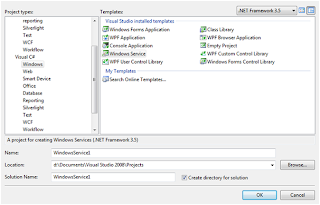
I have an task to run a Stored procedure after every 30 minutes. My first choice is to create a job on Sql server. But I also have to write a log file along with the stored procedure. Now, my choice will be Windows service. Creating a windows service is a very easy task but how to deply...... let me explain how to work with windows service. Creating a program that can run in the background of the operating system has any benefits, this is very important as the program can run without a graphic user interface. Complex service that are to run are longer time, and without the need the user to login the system. Windows services are harder to develop, debug, and test. But if you software are to run in server that require to start up automatically with the server is turn on, Windows service is your choice. Creating your skeleton project in Visual Studio 2008 To create a Windows Service project in Visual Studio 2008, you must select from the Visual C# Windows Projects. Give your Windows Servi...